
Forest Service Research & Development
Modernizing a Federal Research Website for Accessibility, Clarity, and Public Trust
ROLE
Sole UI/UX Designer
YEARS
2021-2025
A complete redesign of the United States Forest Service Research & Development website focused on improving usability, simplifying navigation, and creating a modern digital experience that aligned with federal accessibility standards.


THE PROBLEM
Researchers, scientists, and members of the public struggled to navigate outdated content and inconsistent user experiences across the USFS Research & Development website.
THE SOLUTION
A Modern, Accessible Redesign That Improved Content Discoverability
The redesigned experience focused on simplifying navigation, improving page hierarchy, and creating a cleaner visual system that could scale across a large research-focused website.

BACKGROUND
Connecting Users to Critical Research and Resources
The United States Forest Service Research & Development website serves as a central hub for scientific research, forestry data, environmental studies, and conservation resources. The platform supports a wide range of audiences including researchers, scientists, government employees, media partners, and members of the public seeking educational information.
Over time, the website had grown into a large ecosystem of content with inconsistent layouts and complex navigation structures that made information difficult to discover. While the site contained valuable research and resources, the overall experience often felt overwhelming and difficult to navigate.
RESEARCH
Understanding User Needs Within a Content-Heavy Government Environment
To better understand the experience as a whole, I evaluated the website in its current state to identify patterns, gaps, and opportunities for improvement.
Key Insights
Through stakeholder conversations and site analysis, several recurring issues became clear:
-
Users struggled to quickly locate important information
-
Content pages lacked clear hierarchy, readability, and consistency
-
Navigation structures became overwhelming due to the amount of information available
-
A clear design system was needed as the inconsistencies of component usage across the site was confusing
-
Accessibility needed to become a foundational part of the design process rather than an afterthought
Forest Service R&D Website Analysis
The website analysis process took a few different steps to get a full understanding:
-
Blind Review: Navigate through the website as a user who has never seen the site before, clicking around and noting down what sticks out to me.
-
Guided Review: Work with the product owner to identify what workflows are frequented the most by users and follow that same path.
Each review included the following:
-
Reviewing legacy page structures and navigation systems
-
Identifying pain points caused by inconsistent layouts
-
Evaluating Section 508 and WCAG accessibility errors within the existing experience
Strengths
-
Consistent use of components
-
Large ecosystem of informational resources
-
Clear service and program-based content
Government Agency Competitor Website Analysis
I reviewed three government agencies recommended to me by the product owner that have a similar public-facing web product and uncovered key insights:

Weaknesses
-
Overly-Complex navigation structures
-
Dense, content-heavy layouts
-
Inconsistent visual hierarchy
Opportunities
-
Simplify information architecture
-
Modernize the user interface
-
Improve content discoverability
Threats
-
Large legacy content systems to migrate
-
Diverse groups of researchers and scientists all wanting their work highlighted
DEFINE
Balancing Accessibility, Scalability, and Usability
The core challenge became clear early in the project:
How might we simplify a complex government research website while ensuring accessibility, usability, and long-term scalability?
The redesign needed to serve multiple audiences simultaneously, including:
.png)


To support these different audiences, the experience needed to prioritize:
-
Clear navigation and predictable layouts
-
Strong visual hierarchy for dense information
-
Accessibility-first design decisions
-
Reusable systems and components
-
Consistency across all page types
IDEATION
Exploring Structures That Simplified Complex Content
Once the core challenges were defined, I began exploring layout directions and information structures that could better support users navigating large amounts of research content.

Results
-
Quickly explored navigation and layout options
-
Allowed early validation of information hierarchy with product owners before high-fidelity design
-
Reduced rework by identifying usability issues in structure and flow
Low-Fidelity Mockups
I created low-fidelity wireframes and page concepts focused on:
-
Identifying possible solutions to simplifying page layouts
-
Reducing cognitive overload
-
Creating more consistent navigation patterns
-
Establishing reusable content modules

Information Architecture
Working closely with product owners in previous phases helped enabled be to create a brand new IA that was meant to:
-
Organize content into clearer categories
-
Improve menu structures
-
Reduce unnecessary complexity within the navigation experience
This process laid the foundation for a more intuitive and scalable user experience.
DESIGN
Designing Within the Constraints of Federal Standards
After aligning on structure and direction, I transitioned into high-fidelity design work.
Using the U.S. Web Design System (USWDS) as the foundation, I designed responsive page layouts that balanced usability with federal compliance standards.
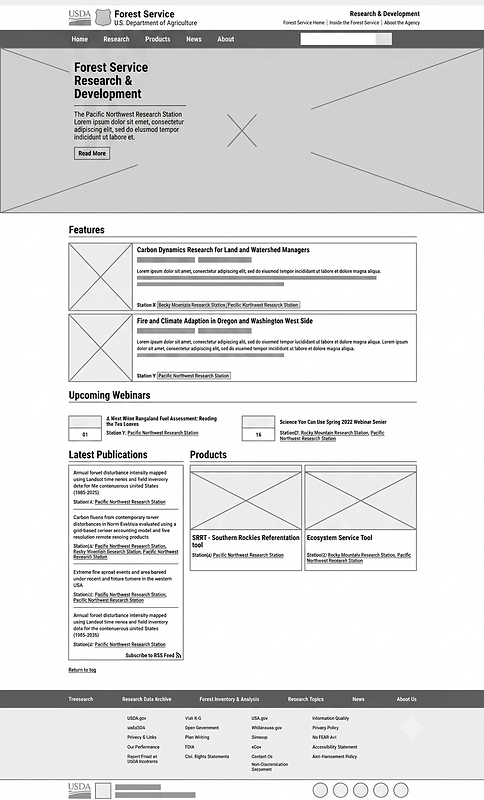

Creating a Cohesive Visual System
Rather than designing isolated pages, I focused on building a consistent system that could scale across the entire platform.
This included:
-
Creating standardized page templates with reusable UI components
-
Consistent spacing and layout rules
-
Flexible content structures for future expansion
The final designs created a cleaner, more modern experience while still feeling trustworthy and aligned with expectations for a government website.


TESTING & ITERATIONS
Refining the Experience Through Stakeholder Feedback
Throughout the project, I worked closely with stakeholders and developers to refine layouts, navigation structures, and content organization.
Because government projects involve many layers of review and compliance considerations, iteration became a critical part of the process.
Common areas of refinement included:
-
Adjusting navigation labels for clarity
-
Refining spacing and hierarchy to reduce cognitive load
-
Ensuring accessibility standards were consistently met
Collaboration between design, development, and stakeholders helped ensure the final product remained both user-centered and technically feasible.
RESULTS
Delivering a More Accessible and User-Friendly Research Platform
The redesigned USFS Research & Development website provided a significantly more modern and approachable experience for users navigating complex research content.
The project successfully:
-
Modernized the visual design of the platform
-
Improved navigation and content discoverability
-
Established scalable design patterns for future growth
-
Maintained compliance with Section 508 and WCAG
-
Created a more consistent experience across the site
This project also played a major role in my professional growth as a UX designer. It strengthened my ability to work within complex systems, collaborate with stakeholders, and design effectively within strict accessibility and compliance constraints.
"The navigation feels much clearer, everything is where I expect it to be now."
Stakeholder during Prototype Review
FINAL THOUGHTS
Learning How to Design Within Real-World Constraints
What I Learned: This project reinforced the importance of designing for structure and clarity before aesthetics. Working within a large, content-heavy government system showed me how important information architecture, accessibility, and consistency are when users are trying to complete real tasks quickly. I also learned how valuable early stakeholder alignment is in reducing friction during later design and review phases.
What I'm Most Proud Of: I’m most proud of how much clarity this redesign brought to a complex and overwhelming system. Turning a dense, difficult-to-navigate website into a more structured and intuitive experience was a meaningful challenge. I’m also proud of creating a design system approach that supports consistency across a large and varied content ecosystem while still meeting strict accessibility and federal standards.